How to Identify Fake Teen Patti Master APK Downloads
Searching for Teen Patti Master online can lead users to multiple websites offering APK files, installation instructions, and claims about special bonuses. Some websites may provide useful information, but others may publish misleading download buttons, outdated files, or unsupported claims about the application.
The challenge is that a professional-looking website does not automatically mean its files are safe. A page can use familiar branding, attractive graphics, and convincing descriptions without being associated with the original application developer.
For Android users, understanding these warning signs is an important part of making an informed decision. This guide explains how to assess a Teen Patti Master APK download, what to check before installation, and what to do if an application behaves suspiciously.
Why Do Fake APK Downloads Exist?
APK files allow Android applications to be distributed outside the Google Play Store. This format has legitimate uses, but it also creates opportunities for people to distribute modified or misleading files.
A website may advertise an APK as the latest version even when the file is outdated. Another may place several advertisements around a download button, making it difficult to identify the actual file. In more serious cases, a malicious application may imitate a familiar game’s name or appearance.
Common reasons for suspicious downloads include:
- Attracting visitors through popular search terms.
- Collecting personal information through deceptive forms.
- Encouraging users to install unwanted applications.
- Displaying misleading advertisements or subscription prompts.
- Promoting modified software without explaining its risks.
- Impersonating customer support to obtain verification codes.
Not every third-party APK is malicious, and a website’s appearance alone cannot establish whether a file is harmful. Verification requires more than simply trusting a download page.
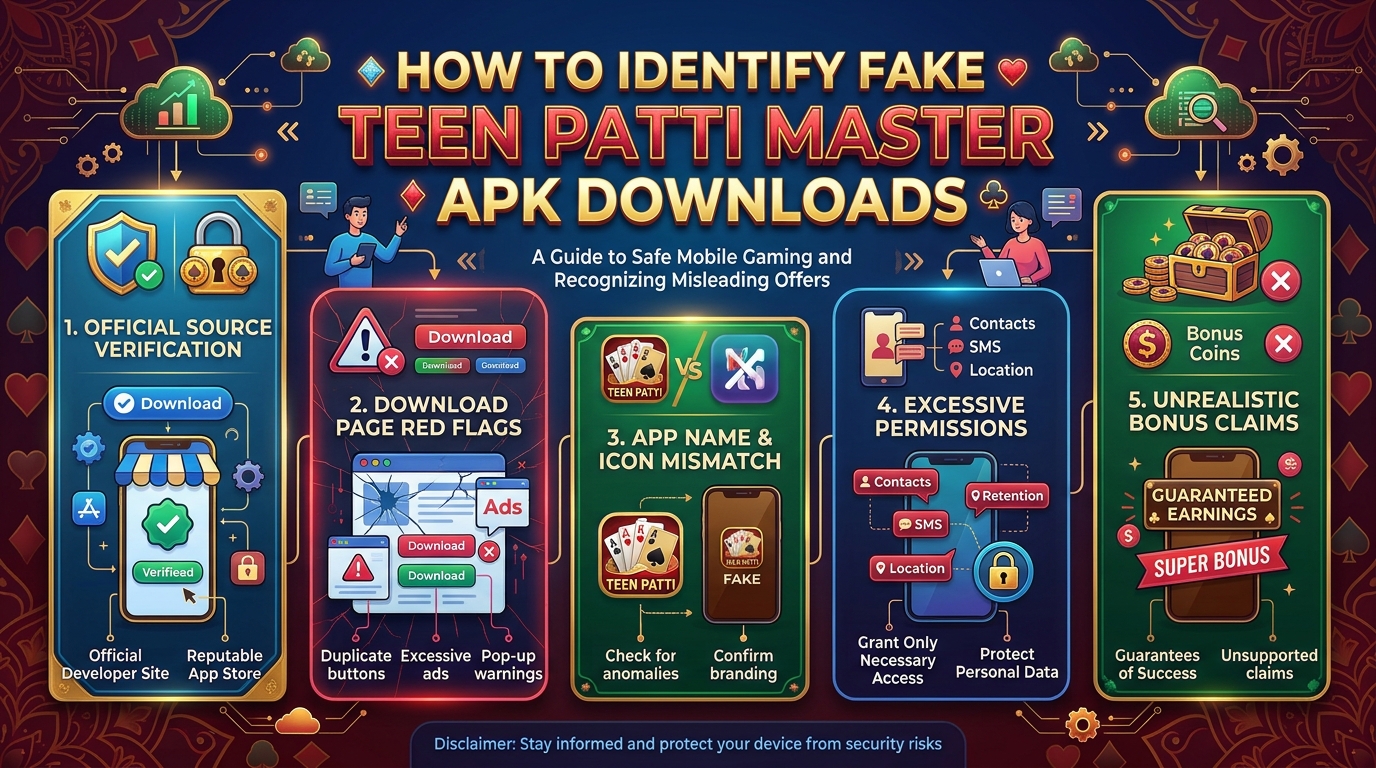
Warning Signs to Look For Before Downloading
1. Unrealistic Promises
Be cautious of pages that promise guaranteed winnings, unlimited coins, instant withdrawals, or bonuses without meaningful conditions.
A promotional claim is not proof that an offer exists. Legitimate offers should have understandable eligibility requirements, expiry dates where applicable, and clearly explained terms.
Never provide payment information merely to unlock a reward advertised by an unknown website.
2. Too Many Download Buttons
Some websites display several large buttons labelled Download APK, Start Download, Fast Download, or Update Now. Not all of them necessarily lead to the intended application.
Before clicking, examine the destination and the website address. Avoid buttons that redirect through unrelated pages, initiate unexpected downloads, or request unnecessary browser notifications.
If you cannot determine which file is genuine, leave the page rather than guessing.
3. Missing Developer Information
A trustworthy download source should provide enough information to identify the publisher and the application. Look for developer details, version information, a privacy policy, and a reliable support channel.
Missing information does not automatically prove fraud, but it reduces your ability to verify the file.
For background research, this Teen Patti Master information page may be useful. However, a third-party information page should not be treated as official developer confirmation unless that relationship can be independently verified.
4. Requests to Disable Security Protection
Treat instructions to disable Google Play Protect or other security features as a serious warning sign.
Some legitimate applications distributed outside official stores may trigger installation warnings because they have not undergone the same distribution process. Nevertheless, you should not ignore a warning simply because a website tells you to do so.
Stop and investigate the source. If you cannot establish that the file is legitimate, do not install it.
5. Unusual Permission Requests
An application’s requested permissions should make sense for its functionality.
For example, a card game may need internet access. However, unexpected requests for SMS access, contacts, accessibility controls, or extensive background activity deserve closer examination.
Permissions vary by Android version and application design, so judge them in context. Do not approve sensitive access merely because the installation instructions demand it.
A Step-by-Step APK Safety Checklist
Use the following process before installing a Teen Patti Master APK.
Step 1: Verify the source. Identify who publishes the file and whether the source is connected to the original developer. Look for independently verifiable information rather than relying on branding.
Step 2: Check the application details. Compare the app name, developer, version, and package information where trustworthy references are available. Similar names do not establish that two files are identical.
Step 3: Inspect the download link. Confirm that it leads to the expected website and does not trigger unrelated downloads. Avoid suspicious URL shorteners and pages that repeatedly redirect.
Step 4: Scan the file. Use reputable security software and, where appropriate, a recognised multi-engine scanning service. A clean scan can provide useful evidence, but it cannot guarantee that a file is safe.
Step 5: Review permissions. Before using the application, examine the access it requests. Deny permissions that are unnecessary, and stop if the app cannot explain why sensitive access is required.
Step 6: Protect your account. Never share an OTP, password, or recovery code. Avoid entering account credentials into forms opened through unsolicited messages.
Step 7: Keep your device protected. Install Android security updates when available, leave built-in protections enabled, and remove applications that you no longer trust.
Following these steps cannot eliminate every risk, but it can help you avoid many common mistakes.
How to Evaluate a Download Website
A website’s credibility should be assessed through several independent signals.
Check whether its content explains the application accurately, whether the download destination is transparent, and whether the publisher’s identity can be verified. Review the privacy policy and look for clear support information.
Pay attention to contradictory details. A page may claim that a file is the newest version while showing old screenshots or inconsistent version numbers. Such discrepancies deserve investigation.
Also distinguish between an information website and the actual application publisher. A website may publish guides without distributing the software itself. That is not necessarily a problem, provided its role is clearly explained.
You can review this Teen Patti Master guide for additional context, but independently verify any download links, publisher claims, or security statements before acting on them.
What If You Have Already Installed a Suspicious APK?
If you believe an application may be unsafe, take the following precautions.
- Stop using the application and disconnect it from sensitive accounts where appropriate.
- Review its permissions in your Android settings and revoke unnecessary access.
- Run a scan using a reputable security tool.
- Uninstall the application if you cannot establish that it is trustworthy.
- If you entered a password, change it from a trusted device and enable additional account protection where available.
- Contact your bank or payment provider promptly if you shared financial information or notice unauthorised transactions.
- Review recent account activity and watch for unexpected messages or login alerts.
If the application has administrator privileges or accessibility access that prevents normal removal, use Android’s official security guidance or seek assistance from a qualified technician.
Do not install another unknown APK that claims to clean or repair the first one.
Can an APK Scanner Guarantee Safety?
No. Security scanners can identify known threats and suspicious patterns, but they cannot guarantee that every file is harmless.
A newly created malicious application may not yet be recognised by all scanners. Conversely, some legitimate files may produce warnings because their reputation or distribution history is limited.
Use scanning as one part of a broader verification process. Consider the publisher, download source, requested permissions, file behaviour, and available independent evidence together.
Protecting Personal and Financial Information
If a gaming application offers account registration or transactions, read its privacy and transaction policies before providing information.
Never disclose an OTP to someone claiming to help with installation, bonus activation, or account recovery. Do not share your screen with an unknown person who asks you to open banking applications or payment services.
Avoid paying an advance fee to release a supposed reward or withdrawal. Verify any such requirement through a trustworthy, independently confirmed service channel.
If you participate in a real-money gaming service, check the relevant eligibility rules and local laws. Do not assume that advertised winnings are guaranteed or that every promotion is withdrawable.
Final Thoughts
Identifying a fake Teen Patti Master APK requires more than looking at a website’s design or download button. The most useful checks involve verifying the source, examining the application’s details, reviewing permissions, and maintaining device security.
Be especially cautious of guaranteed-reward claims, unexplained redirects, pressure to disable protection, and requests for sensitive account information.
If a file cannot be verified, the safest choice is not to install it. A few careful checks are worth more than risking personal information or device security for an uncertain download.